

What is in a
"Clarity Scan"?
79% of customers do online research before making purchase decisions. Missing or partial information about your business leads to confusion and lost buyers. We can help you enhance your online presence and resolve the errors mentioned in the report in the following topic areas:
Claim A Free Marketing Audit Of Your Business
We'll show you exactly where you're falling short when
it comes to your Online Marketing.
For no cost, you'll receive:
Your Online Marketing Audit
A checklist of the exact items you need to fix
Business Details
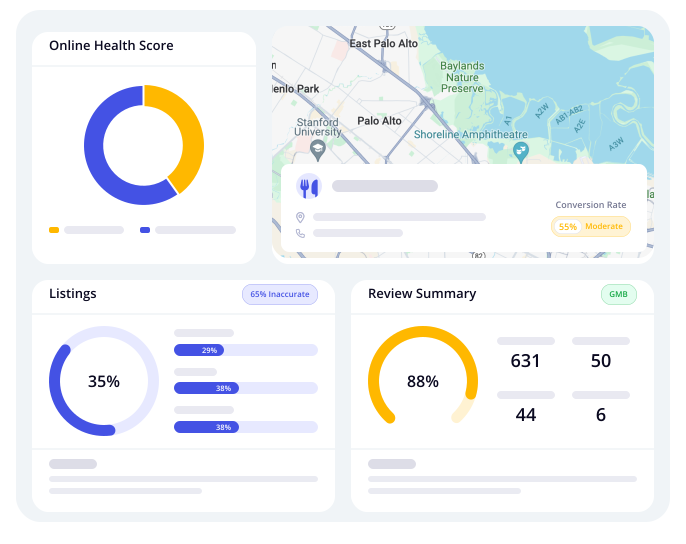
We'll show you your performance in the folloving areas related to your Google Business Details when it comes to your Online Marketing.
You'll receive:
Why it matters: Accurate and complete business information builds trust with prospects and prevents confusion—every mismatch or omission costs you clicks, calls and conversions.
Chat Widget
This identifies whether the business has a live chat solution in place, which is a basic but crucial engagement tool.

FAQ's
Is there a chat widget currently installed on your website?
A chat widget allows real-time visitor interaction, reducing bounce rates and increasing lead capture by addressing objections instantly. It also builds trust with prompt support. Check the website manually or use GHL’s audit scanner to see if one is installed—if not, consider adding it.
Is the chat widget visible and functional on both desktop and mobile?
A responsive chat widget ensures a seamless user experience across all devices, reducing mobile bounce rates and improving engagement. It also enhances conversions by meeting users where they are. Test the widget on different screen sizes and adjust placement or responsiveness if needed.
Is the chat widget configured to capture leads (name, email, phone)?
A chat widget should actively collect lead information to maximize its effectiveness. If it's not capturing details, it's missing an opportunity to build a qualified lead database and enable personalized follow-ups. Audit the widget settings to ensure form fields are in place, and add automated questions to gather name, email, and phone. This supports automated workflows, enhances lead nurturing, and boosts ROI by capturing valuable contact data from site visitors.
Is the widget set up with business hours or automated replies after hours?
An auto-response for after-hours messages ensures a smooth user experience and keeps potential leads engaged. Without it, inquiries may be lost. Configure business hours in chat settings and set up automated replies or chatbot fallback messages. This maximizes lead capture 24/7, prevents missed opportunities, and enhances professionalism and user satisfaction.
Is the chat widget integrated with your CRM or GHL pipeline?
Capturing chats is valuable, but syncing them to your CRM ensures leads are properly managed. Connect the chat widget to a CRM like HighLevel and set up automation to tag and assign new leads. This centralizes lead management, enables instant nurturing campaigns, speeds up response time, and helps sales teams close more deals with organized data.
Is there a welcome message or proactive prompt to engage users?
A proactive chat message encourages visitors to engage, as many won’t start a conversation on their own. Adding a friendly, relevant welcome message like “Need help finding the right service?” can make the site feel more interactive and helpful. A/B test different prompts to optimize engagement. This approach increases conversations, warms up cold visitors, and boosts the chances of converting curious browsers into leads.
Are chat responses monitored and answered in a timely manner?
Quick responses prevent frustration and lost leads. Reviewing response time analytics and assigning team members to monitor chat during business hours ensures visitors receive timely assistance. This boosts satisfaction, improves conversion rates, and gives you a competitive edge while reducing the need for additional customer support.
Is there a chatbot in place to handle FAQs or pre-qualify leads?
A chatbot enhances engagement by answering common questions and filtering serious leads from casual visitors. Setting up chatbot workflows for FAQs and qualifying questions saves staff time and improves user experience with instant responses. Routing qualified leads to human agents or booking pages ensures efficiency, increases conversions, and reduces operational overhead.
Does the chat widget support scheduling or calendar integration?
Integrating a booking calendar within the chat widget allows users to schedule appointments instantly, speeding up conversions. Connect the widget to a scheduling tool like GHL Calendar and set up automated triggers for booking. This reduces friction in the sales process, captures leads at peak interest, shortens the sales cycle, and improves no-show rates by securing commitments in real time.
Is the widget branded properly with your business name/logo/colors?
A generic or mismatched chat widget can reduce trust and engagement. Customize it with your brand colors, logo, and a welcome message that matches your brand voice. This enhances professionalism, builds brand recognition, and creates a cohesive experience—leading to higher engagement and conversion rates.
Text-Enabled Business Number
Detect if your listed phone number is text (SMS) capable. 9 out of 10 people want to use messaging to interact with businesses! It’s critical that businesses offer Text Messaging as a communication channel for their customers.

FAQ's
Is your primary business number text-enabled (SMS-capable)?
Check with your provider or use tools like Twilio, Bandwidth, or HighLevel to enable SMS without disrupting voice calls. This ensures you can handle both calls and texts, increasing engagement with a 98% open rate and offering convenience for your customers.
Is your text-enabled number actively monitored and responded to?
Set up an automation platform (like HighLevel) to route texts, enable auto-responses for off-hours or FAQs, and assign team members to monitor and respond promptly. This ensures instant responses, prevents leads from going cold, and boosts conversions by engaging customers while interest is high.
Are you using SMS as part of your marketing and follow-up sequences?
Audit your automation flows and add SMS steps for appointment confirmations, promotions, and follow-ups. SMS boosts engagement, reduces no-shows, reactivates dormant leads, and encourages action more effectively than email.
4. Is your SMS system compliant with regulations (TCPA, opt-in/opt-out, etc.)?
Capture explicit opt-in consent, include STOP/HELP commands, and use compliant platforms that manage unsubscribes automatically. This avoids legal issues, builds trust, and improves message deliverability by preventing carrier blocking.
Is your number listed as “Textable” on your Google Business Profile, website, and other directories?
Update your Google Business Profile with a “Chat” feature or mention texting availability. Add "Text us at..." to your website and social media, using icons or callouts to highlight SMS functionality. This encourages customer engagement, gives you a competitive edge, and modernizes your brand image.
Are incoming texts segmented or tagged for better follow-up and automation?
Tag incoming messages using keywords or entry points, and integrate with CRM tools like HighLevel to track customer journeys. This enables personalized follow-up, tracks ROI from campaigns, and supports advanced automation based on behavior or intent.
Are missed texts followed up automatically?
Set up SMS auto-replies for missed messages and use HighLevel’s workflows to alert team members or follow up via email/call. This preserves leads, creates a seamless customer experience, and allows time for manual replies while keeping engagement.
Have you tested the number across devices to ensure deliverability and proper formatting?
Send test texts from multiple carriers and devices, checking emojis, special characters, links, and shortened URLs for proper delivery. This guarantees a consistent brand experience, avoids technical glitches, and ensures your messages aren’t flagged or undelivered.
WordPress Website
Find out if you have an active WordPress site. Having a WordPress site empowers businesses to establish a professional online presence, efficiently engage with customers, optimise their SEO ranking, and thrive in the digital realm.
FAQ's
Is your WordPress website mobile-responsive across all devices?
A responsive site adapts to all screen sizes for a smooth user experience. Test it using Google’s Mobile-Friendly Test, use a responsive theme or custom CSS, and optimize images. This boosts engagement, improves SEO, and reduces bounce rates.
Is your site speed optimized (load time under 3 seconds)?
A fast website improves SEO, user experience, and conversions. Test with GTmetrix or PageSpeed Insights, optimize images, enable caching, and minify CSS/JS. Using a performance-optimized theme and hosting enhances speed, leading to better rankings, higher engagement, and lower bounce rates.
Is SSL (Secure Sockets Layer) enabled on your WordPress site?
Is SSL (Secure Sockets Layer) enabled on your WordPress site? Explanation: SSL ensures your website is secure (HTTPS), encrypting data between users and your server. Action Items: Install and activate an SSL certificate (many hosts offer free SSL via Let's Encrypt). Update WordPress and plugin settings to force HTTPS. Benefits & Advantages: Builds trust with users. Essential for SEO ranking and compliance with Google’s security standards.
Is your WordPress core, theme, and all plugins up to date?
Keeping WordPress, themes, and plugins updated prevents security risks, bugs, and performance issues. Regularly update them and test changes in a staging environment before applying to a live site. This ensures better security, compatibility, and site stability while avoiding crashes or conflicts.
Is your website connected to Google Analytics and Search Console?
Google Analytics and Search Console offer critical insights into user behavior and search performance. Install Google Site Kit or manually add tracking codes, then verify ownership in Search Console. This helps you make data-driven decisions, track indexing issues, and optimize keywords for better visibility.
Is the site structure optimized for SEO (titles, headings, URLs, internal links)?
Is the site structure optimized for SEO (titles, headings, URLs, internal links)? Explanation: An optimized structure helps search engines understand your content and rank it properly. Action Items: Use clear, keyword-rich titles and headings (H1–H3). Use readable, hyphenated URLs. Ensure internal linking improves site navigation. Benefits & Advantages: Boosts organic visibility. Helps users and bots navigate your site easily.
Are there any broken links or missing images on the website?
Broken links and missing images negatively impact user experience and SEO. Use tools like Broken Link Checker to find and fix them. Keeping links and images intact improves credibility, usability, and overall SEO health.
Is your website backed up regularly?
Regular backups protect your site from data loss due to hacking or failed updates. Use plugins like UpdraftPlus or Jetpack to automate daily or weekly backups to the cloud. This ensures quick recovery, business continuity, and peace of mind.
Are you using a reputable SEO plugin like RankMath or Yoast?
SEO plugins optimize your content, meta tags, and overall site structure for better search rankings. Install and configure RankMath or Yoast SEO, and follow their on-page suggestions. This boosts organic traffic and simplifies technical SEO tasks.
Is your WordPress site optimized for local SEO (NAP consistency, schema, location pages)?
Local SEO ensures your business ranks in location-based searches and map listings, making it easier for nearby customers to find you.
Review Replies
Be advised what % of analyzed reviews you have already responded to. Research shows that 89% of consumers tend to prefer local businesses that actively engage with reviews.
FAQ's
Is your primary business number text-enabled (SMS-capable)?
Check with your provider or use tools like Twilio, Bandwidth, or HighLevel to enable SMS without disrupting voice calls. This ensures you can handle both calls and texts, increasing engagement with a 98% open rate and offering convenience for your customers.
Is your text-enabled number actively monitored and responded to?
Set up an automation platform (like HighLevel) to route texts, enable auto-responses for off-hours or FAQs, and assign team members to monitor and respond promptly. This ensures instant responses, prevents leads from going cold, and boosts conversions by engaging customers while interest is high.
Are you using SMS as part of your marketing and follow-up sequences?
Audit your automation flows and add SMS steps for appointment confirmations, promotions, and follow-ups. SMS boosts engagement, reduces no-shows, reactivates dormant leads, and encourages action more effectively than email.
4. Is your SMS system compliant with regulations (TCPA, opt-in/opt-out, etc.)?
Capture explicit opt-in consent, include STOP/HELP commands, and use compliant platforms that manage unsubscribes automatically. This avoids legal issues, builds trust, and improves message deliverability by preventing carrier blocking.
Is your number listed as “Textable” on your Google Business Profile, website, and other directories?
Update your Google Business Profile with a “Chat” feature or mention texting availability. Add "Text us at..." to your website and social media, using icons or callouts to highlight SMS functionality. This encourages customer engagement, gives you a competitive edge, and modernizes your brand image.
Are incoming texts segmented or tagged for better follow-up and automation?
Tag incoming messages using keywords or entry points, and integrate with CRM tools like HighLevel to track customer journeys. This enables personalized follow-up, tracks ROI from campaigns, and supports advanced automation based on behavior or intent.
Are missed texts followed up automatically?
Set up SMS auto-replies for missed messages and use HighLevel’s workflows to alert team members or follow up via email/call. This preserves leads, creates a seamless customer experience, and allows time for manual replies while keeping engagement.
Have you tested the number across devices to ensure deliverability and proper formatting?
Send test texts from multiple carriers and devices, checking emojis, special characters, links, and shortened URLs for proper delivery. This guarantees a consistent brand experience, avoids technical glitches, and ensures your messages aren’t flagged or undelivered.
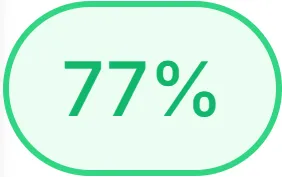
Overall Score for "Your Business Name"
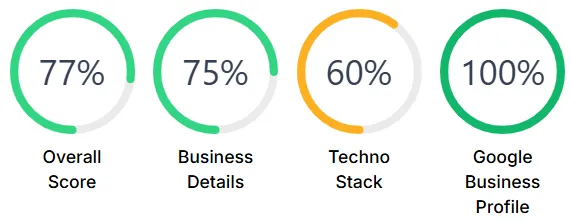
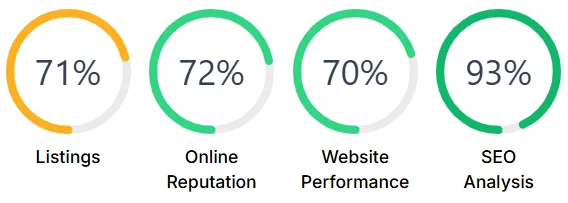
Individual Scores for "Your Business Name"
© 2026 Bizhackz Strategies - All Rights Reserved.


