


What is in a
"Clarity Scan"?
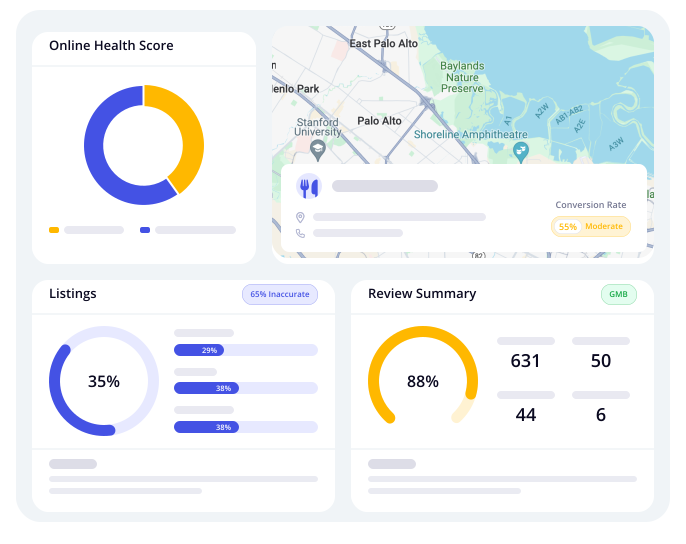
79% of customers do online research before making purchase decisions. Missing or partial information about your business leads to confusion and lost buyers. We can help you enhance your online presence and resolve the errors mentioned in the report in the following topic areas:

Claim A Free Marketing Audit Of Your Business
We'll show you exactly where you're falling short when
it comes to your Online Marketing.
For no cost, you'll receive:
Your Online Marketing Audit
A checklist of the exact items you need to fix
Techno Stack
Evaluate the foundational tools driving your online marketing efforts. A robust digital marketing infrastructure is crucial for measuring performance, understanding your audience, and maximising the return on your marketing investments.
For no cost, you'll receive:
Why it matters: A well-configured tech stack ensures your marketing tools talk to each other seamlessly, cutting wasted time and data gaps so you can make smarter, faster decisions.
Google Tag Manager
Find out if you have implemented Google Tag Manager! This tool allows for efficient management of various marketing tags, streamlining your digital marketing efforts.
Tags help you easily manage and track all your marketing and analytics tags from one central place—without needing to edit your website code.

FAQ's
Is Google Tag Manager Installed on All Website Pages?
Perform a sitewide crawl to verify GTM installation and ensure it’s placed in the and sections. This provides full visibility into user behavior, accurate data collection, and consistent tracking for remarketing and analytics.
Are GTM Tags Firing Correctly?
Use GTM’s Preview & Debug mode to test tag firing and validate with Chrome extensions like Tag Assistant or Ghostery. This ensures your marketing pixels (e.g., Meta Pixel, Google Ads, LinkedIn) are working, maximizing ROI by properly tracking conversions.
Is There a Tag Governance Strategy in Place?
Audit the GTM container regularly, remove unused tags, triggers, and variables, and document each tag’s purpose. This results in a cleaner workspace, faster load times, easier troubleshooting, and reduces the risk of errors during site updates.
Are Tags and Triggers Organized with Clear Naming Conventions?
Create and apply consistent naming conventions for tags, triggers, and variables (e.g., “GA4 – Pageview – All Pages”). This simplifies maintenance, reduces onboarding time, and minimizes errors in tag deployment.
Is GTM Integrated with Google Analytics (GA4) Correctly?
Verify GA4 configuration tags, and set up events, conversions, and parameters based on business goals. This ensures deeper insights into customer behavior across devices, enabling predictive analytics and better reporting for future planning.
Are Conversion Events and Goals Properly Tracked?
Define conversions (e.g., form submissions, calls) and set up event tracking in GTM or via enhanced measurement in GA4. This ensures accurate performance measurement, enabling data-backed marketing decisions and improved optimization of ads and landing pages.
Are Third-Party Marketing Pixels (Meta, LinkedIn, TikTok, etc.) Set Up via GTM?
Verify that all third-party pixels are configured in GTM, ensuring proper triggers and no duplication. This simplifies pixel implementation, allowing non-developers to manage them and enabling faster campaign launches while reducing development dependency.
Are Tags Firing on the Correct Triggering Conditions?
Review each tag’s trigger and refine it to fire only on necessary URLs, clicks, or form submissions. This improves site performance, ensures better-quality data, and leads to lower bounce rates and more targeted data for retargeting and reporting.
Are Custom Events and Data Layer Variables Being Used Effectively?
Is Consent Mode or Cookie Compliance Integrated? Explanation: Many regions now require user consent before firing tracking tags. Action Items: Implement Consent Mode for GTM if targeting EU or other regulated regions. Connect GTM with your cookie management platform. Benefits: Compliant with GDPR, CCPA, and other regulations. Advantages: Avoids legal risks and builds customer trust.
Is Consent Mode or Cookie Compliance Integrated?
Implement Consent Mode for GTM if targeting EU or other regulated regions and connect GTM with your cookie management platform. This ensures compliance with GDPR, CCPA, and other regulations, avoiding legal risks and building customer trust.
Google Analytics Pixel
We detect for Google Analytics on your site. See if you're on the right track to understanding your audience and making data-driven decisions about your online presence.
The Google Analytics Pixel helps you understand how users find, interact with, and convert on your website so you can make smarter marketing decisions.

FAQ's
Is the Google Analytics Pixel installed on all key pages of the website?
If the GA pixel is only on certain pages (like the homepage), you’ll miss important user behavior data on product, checkout, and other pages. This leads to incomplete tracking and inaccurate conversion paths. Installing the pixel on all pages provides consistent tracking across the user journey, enabling full-funnel analysis, heatmap-style tracking, and better conversion insights.
Is the pixel firing correctly without errors?
Even with installation, issues like duplicate tags, consent restrictions, ad blockers, or broken scripts can prevent the pixel from firing, leading to data drop-offs and unreliable analytics. Ensuring the pixel fires correctly guarantees reliable campaign performance analysis and accurate site behavior tracking.
Is the correct Google Analytics property ID being used?
Using the wrong GA property ID (from a staging environment or old account) can contaminate your data. Cross-checking ensures your data remains clean, relevant, and accurate in real-time.
Are enhanced tracking features enabled (e.g., scroll depth, outbound clicks, video views)?
Enabling enhanced tracking features in GA4 captures valuable user interactions like scroll depth, video views, and file downloads, helping you understand behavior beyond pageviews and making smarter content and UX decisions.
Are goals or conversion events set up correctly in Google Analytics?
Setting up conversion events (e.g., form submissions, purchases) in GA allows you to measure ROI, optimizing campaigns based on real outcomes rather than vanity metrics.
Is the pixel integrated with other marketing platforms (e.g., Google Ads, Meta, HubSpot)?
Integrating GA with platforms like Google Ads and Meta enables seamless conversion tracking, audience sharing, and remarketing based on real user behavior, breaking data silos and enhancing automation.
Is IP anonymization configured if required by data privacy laws (e.g., GDPR, CCPA)?
IP anonymization helps comply with laws like GDPR and CCPA, protecting user privacy and preventing legal issues while building customer trust.
Are internal and bot traffic excluded from Google Analytics reporting?
Excluding internal and bot traffic ensures that your data is accurate and reflective of real user behavior, making metrics like session duration and bounce rate reliable.
Is cross-domain tracking enabled if you're using multiple domains or subdomains?
Cross-domain tracking ensures that user sessions remain intact as they navigate between domains, preventing misattribution and maintaining a full view of their journey.
Are UTM parameters consistently used for campaign tracking?
UTM tags provide detailed insights into where visitors come from, ensuring accurate ROI tracking and better campaign performance analysis.
Facebook Pixel
We detect for the Facebook Pixel on your site. This ensures that you are not missing opportunities to optimise your Facebook ad campaigns and build more targeted audiences. With it, you can measure website activity to help create smarter, more targeted ads that drive better results.

FAQ's
Is the Facebook Pixel installed on all key pages (e.g., homepage, product pages, checkout, thank you)?
Ensure the Facebook Pixel is installed on high-value pages for complete tracking. Use tools like Facebook Pixel Helper to verify installation and audit your GHL funnel or website. This provides full-funnel tracking, enabling retargeting, conversion tracking, and lookalike audience generation.
Is the Pixel firing properly and only once per page?
Ensure the Pixel is firing correctly and only once per page to avoid skewed data. Use Facebook Events Manager or Pixel Helper to verify and clean up any duplicate or erroneous code. This ensures accurate conversion data, better ad optimization, and reduced cost-per-result.
Are standard events (e.g., ViewContent, AddToCart, InitiateCheckout, Purchase) implemented?
Ensure that standard events are added, either manually or via GHL’s event triggers with custom code. This enables precise tracking of user behavior through the sales funnel, unlocking more ad objectives and better event-based optimization for improved campaign results.
Are custom events or custom conversions being used where appropriate?
Custom events allow you to track specific actions like booking a call or downloading a lead magnet. Identify your unique KPIs and configure custom events using Facebook Events Manager or GHL triggers. This provides tailored tracking aligned with your business goals and gives you more control and accuracy in measuring success metrics.
Is the Pixel connected to the correct Business Manager and Ad Account?
Is the Pixel connected to the correct Business Manager and Ad Account? Explanation: A mismatch could mean data is going to the wrong dashboard or being lost. Action Items: Double-check Facebook Events Manager and Business Settings. Benefits: Centralized data and proper audience building. Advantages: Ensures efficient ad spend and attribution accuracy. 6. Are Pixel Events being tracked through the GHL Funnel correctly? Explanation: When using High Level funnels, the custom JS placement must match GHL’s funnel structure. Action Items: Check the placement of event tracking code in the funnel builder ( or custom JS section). Benefits: Enables seamless conversion tracking within GHL. Advantages: Better performance data for funnel optimization.
Has Facebook’s Aggregated Event Measurement (AEM) been configured (for iOS 14+ compliance)?
AEM ensures tracking accuracy for Apple users after the App Tracking Transparency (ATT) rollout. To configure, verify your domain in Facebook Business Manager and set up priority events under Web Events. This helps maintain attribution and reporting integrity across devices, ensuring continued performance despite privacy restrictions.
Are retargeting audiences based on Pixel data being used effectively?
Domain verification is required for running conversion campaigns, particularly post-iOS 14. To verify, go to Business Manager > Brand Safety > Domains and use methods like a meta-tag, DNS, or HTML file. This process unlocks full event tracking and ensures that your AEM setup works correctly. It also guarantees compliance with Facebook's requirements for ad delivery.
Are lookalike audiences being created from Pixel data?
Lookalike audiences help you reach new prospects similar to your existing converters. To create them, use Purchase or Lead event-based custom audiences as a seed for lookalikes. This leads to higher-quality leads at scale and allows better targeting, higher relevance, and improved ad results. By leveraging Pixel data for these audiences, you can enhance your ad strategy and reach users who are more likely to convert.
Are there any Pixel-related errors showing in Facebook Events Manager?
Errors in Facebook Events Manager may indicate issues with your Pixel implementation or outdated code. It's essential to regularly monitor for alerts and promptly correct any syntax or trigger problems. By addressing these errors quickly, you'll ensure smooth campaign performance, reduce wasted ad spend, and have better trust in your data. This improves the accuracy of your tracking and ensures your ads are optimized effectively.
Is advanced matching enabled (manual or automatic)?
Advanced Matching helps increase the match rate by utilizing data such as emails, phone numbers, or other customer identifiers. This improves the accuracy of tracking and conversion attribution.
Google Ads Pixel
We look for the Google Ads conversion tracking pixel. Without it, you could limit your ability to measure the ROI of your Google Ads campaigns and make data-driven decisions to improve performance. With it, it helps you track actions people take after clicking your ads so you can measure results and optimize campaigns for better performance.

FAQ's
Is the Google Ads Pixel installed on the website?
The Google Ads Pixel tracks user behavior after they click on your ads, enabling accurate conversion tracking and remarketing.
Is the Google Ads Pixel firing correctly on all key pages (e.g., landing pages, thank you pages, checkout, etc.)?
The pixel must trigger on all key steps of the user journey to capture complete data for performance tracking and avoid missing or incorrect conversion data.
Are enhanced conversions enabled for the Google Ads Pixel?
Enhanced conversions allow hashed customer data (email, phone, etc.) to be sent to Google for more accurate conversion matching, improving lead and sales tracking.
Are conversion events properly defined and aligned with business goals?
Conversions should represent meaningful actions (e.g., purchases, form submissions) that align with business goals, not just page views or clicks. Properly defined conversions ensure efficient ad spend and better campaign performance.
Are you using Google Tag Manager (GTM) to manage the Google Ads Pixel?
GTM centralizes tag management, enhances site speed, and reduces reliance on developers. It allows easier updates and management of tags without touching the website code.
Are remarketing audiences being built from the Google Ads Pixel?
The Google Ads Pixel collects visitor data, enabling the creation of remarketing audiences for targeted ads. This helps you stay top-of-mind with warm leads.
Is conversion tracking integrated with CRM or offline sales data?
For conversions like B2B sales that happen outside the website, integrating offline data with Google Ads helps close the customer journey loop, ensuring full-funnel ROI is tracked.
Is there any duplicate or conflicting tracking from other tools (e.g., Facebook Pixel, Analytics, etc.)?
Multiple tracking tools can overlap or conflict, leading to inaccurate data. To ensure clean, reliable data, audit tag triggers and set exclusive triggers to avoid double counting. This prevents inflated metrics, allowing for more accurate decision-making.
Is the attribution model in Google Ads optimized for your sales cycle?
Google offers different attribution models (e.g., last click, data-driven, time decay). To optimize for your sales cycle, analyze your average customer journey and use data-driven attribution if eligible. This ensures fair credit across multiple touchpoints in the funnel, leading to smarter bidding and budget allocation.
Are you leveraging conversion value tracking to measure revenue, not just leads?
Assigning a monetary value to each conversion enables profit-focused optimization. In GHL, you can assign dynamic values to conversion events and integrate eCommerce or CRM data to track this. This helps quickly assess campaign profitability and guides smart bidding towards higher-value users.
Google Ads Account Linked
We detect if your business is actively running Google Ads campaigns. Find out if you're leveraging Google's advertising platform to reach potential customers, which can be a powerful tool for growth. Google Ads Linked Account helps you reach the right audience at the right time across search, YouTube, and millions of websites—driving more traffic, leads, and sales for your business.

FAQ's
Is the Google Ads Account linked to Google Analytics and GA4 properly?
Linking Google Ads to GA4 improves tracking, attribution, and campaign optimization. Ensure proper integration, enable data sharing, and import conversions. This helps analyze user behavior, identify high-value campaigns, and optimize targeting for better ROI.
Are Google Ads conversions being tracked and imported correctly into the platform?
Proper conversion tracking is essential for measuring campaign effectiveness. Ensure key conversion events (form submissions, purchases, calls) are tracked in GA4 and imported into Google Ads. Use Google Tag Manager for better control if needed. This helps track user actions, optimize budget for high-performing campaigns, and leverage Smart Bidding to scale results.
Is auto-tagging enabled in Google Ads?
Auto-tagging in Google Ads appends a unique identifier (gclid) to ad URLs for better tracking and attribution in Analytics. Ensure it’s enabled in Settings > Account Settings and that your website supports it. This enhances cross-platform tracking, improves conversion measurement, and enables smarter reporting and optimization.
Are audiences from Google Analytics being shared with Google Ads for remarketing?
Sharing GA4 audiences with Google Ads enables targeted remarketing. Ensure accounts are linked, create audience segments (e.g., cart abandoners, page viewers), and share them under Admin > Audiences > Share with Ads with ad personalization enabled. This boosts conversion rates, lowers CPA, and re-engages warm leads effectively.
Is Google Ads linked to Google Search Console for SEO and PPC synergy?
Linking Google Ads to Search Console helps compare paid vs. organic traffic and uncover keyword opportunities. Ensure both accounts use the same Google login and link them under Google Ads > Tools > Linked Accounts > Search Console. This optimizes bidding, reduces ad spend on high-ranking organic terms, and fills gaps where organic reach is low.
Is the correct Google Ads account linked to the correct website or subaccount?
Ensure the correct Google Ads account is linked to the right website or subaccount to prevent misreporting. Check Admin > Product Linking to confirm alignment with the correct domain or brand. This ensures accurate data, better campaign segmentation, and streamlined multi-brand management.4o
Are all necessary goals from GA4 imported into Google Ads as conversions?
Ensure key GA4 goals (sign-ups, downloads, etc.) are imported into Google Ads for accurate conversion tracking. In GA4 > Admin > Events, mark key events as conversions, then import them in Google Ads > Tools > Conversions > Import from GA4. This enables smarter bidding, better performance tracking, and campaigns focused on real business results.4o
Are UTM parameters being used correctly alongside Google Ads tracking?
Ensure UTM parameters are used correctly alongside Google Ads tracking for backup tracking in CRMs and third-party tools. Apply consistent utm_source, utm_medium, utm_campaign in final URLs, aligning with naming conventions. This ensures seamless multi-platform tracking, prevents data gaps if GCLID tracking fails, and maintains clear attribution across all marketing channels.4o
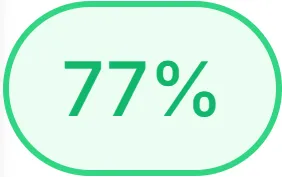
Overall Score for "Your Business Name"
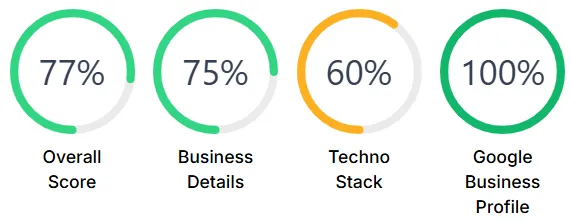
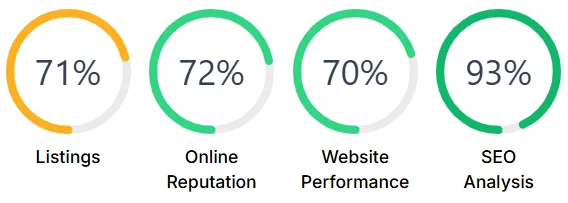
Individual Scores for "Your Business Name"
© 2026 Bizhackz Strategies - All Rights Reserved.


