


What is in a
"Clarity Scan"?
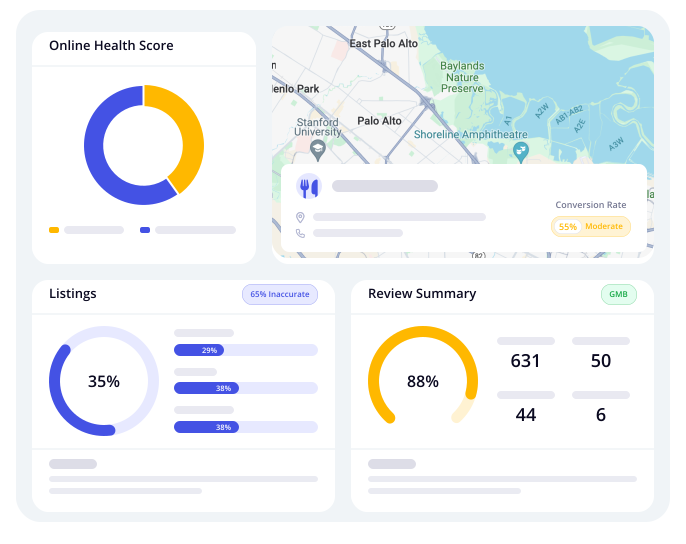
79% of customers do online research before making purchase decisions. Missing or partial information about your business leads to confusion and lost buyers. We can help you enhance your online presence and resolve the errors mentioned in the report in the following topic areas:

Claim A Free Marketing Audit Of Your Business
We'll show you exactly where you're falling short when
it comes to your Online Marketing.
For no cost, you'll receive:
Your Online Marketing Audit
A checklist of the exact items you need to fix

Web Performance
We'll show you exactly where you're falling short when
it comes to your Online Marketing.
For no cost, you'll receive:
Why it matters: Speed and mobile-friendliness directly impact user experience, bounce rates and search rankings—every second saved in load time pays dividends in engagement and lead generation.

Page Speed
Elevating page speed is crucial for local businesses to ensure a superior user experience and boost SEO performance.

FAQ's
How fast does your website load on desktop and mobile devices?
Page load speed is crucial for user experience and SEO. Slow loading times, especially on mobile, can frustrate users and lead to higher bounce rates. Google recommends under 3 seconds for optimal performance, and with mobile-first indexing, the mobile version of your site is prioritized. Improving load speed enhances user engagement, boosts rankings, and increases conversions.2/24o mini
Are your images properly optimized for web performance?
Images can significantly impact page load time, especially if they’re unoptimized. Compressing and resizing images and using formats like WebP or AVIF helps reduce load time, saving bandwidth and improving user experience. Implementing lazy loading ensures images load only when needed, boosting performance. Optimized images lead to faster page loads, improved user retention, and higher conversions.
Are you using a content delivery network (CDN)?
A CDN (Content Delivery Network) distributes your website’s content across multiple global servers, ensuring that users access the site from the nearest server for faster load times. It also provides caching for static assets and protection from DDoS attacks. Setting up a CDN reduces load times globally, increases site resilience, and improves reliability, especially during traffic spikes, making your site scalable and more accessible internationally.4o mini
Are you minimizing HTTP requests and file sizes (CSS/JS)?
Minimizing HTTP requests and file sizes (CSS/JS) ensures faster page loading by reducing the number of files that need to be loaded and optimizing them for size. Combining files and using minification tools can improve load times, especially on slower networks. Deferring or making non-critical JavaScript asynchronous further enhances performance. This leads to a smoother, quicker user experience and better metrics like Time to Interactive (TTI) and First Contentful Paint (FCP).
Do you use caching strategies effectively?
Effective caching strategies improve site speed for repeat visitors by storing copies of your site, reducing the need to reload content. Implementing browser and server-level caching, along with proper cache expiration policies, reduces server load and speeds up page delivery. This results in faster loading times, better user retention, and the ability to handle more traffic efficiently.4o mini
Is your hosting environment contributing to speed issues?
A weak hosting environment, such as shared hosting, can lead to slow response times and poor site performance, especially during high traffic. Upgrading to a VPS, managed WordPress hosting, or cloud hosting can significantly improve server response times and provide more control over resources. This leads to stable performance, fewer outages, and better uptime guarantees.4o mini
Are render-blocking resources delaying the First Contentful Paint (FCP)?
Render-blocking resources like CSS or JavaScript delay the display of content, impacting the First Contentful Paint (FCP). To fix this, use tools like PageSpeed Insights to identify render-blockers, inline critical CSS, and defer non-essential scripts. This will make content appear faster, improve user trust, and enhance user experience by achieving a better FCP and perceived speed.4o mini
Are third-party scripts slowing down your site?
Third-party scripts like live chat, ads, and analytics can slow down your site if not optimized properly. Audit all third-party scripts, remove unnecessary ones, and load critical scripts asynchronously or via tag managers. This will streamline the user experience, give you better control, and ensure faster load times, leading to happier users and fewer issues with external services.4o mini
How does your page speed score compare to competitors in your niche?
To assess how your page speed compares to competitors, run PageSpeed and GTmetrix tests on their websites. This helps you understand their best practices and set a real-world benchmark for your own site. A faster site improves user experience, helps you outperform slower competitors, and positions your business as a leader in smooth, fast browsing.4o mini
Are your Core Web Vitals (LCP, FID, CLS) in the green?
To ensure your website performs well, check your Core Web Vitals (LCP, FID, CLS) using Search Console and PageSpeed Insights. LCP measures when the main content loads, FID tracks the site's response to user interaction, and CLS gauges visual stability during loading. Optimizing these metrics (e.g., improving font loading and reducing layout shifts) enhances user experience, boosts SEO rankings, and provides a smoother, more stable browsing experience.4o mini
Core Web Vitals
Core web vitals provide key indicators that measure your website's performance and user experience. Google Search refers to these when evaluating page experience, so it's important that they are monitored and actioned upon.

FAQ's
Is our website passing Core Web Vitals on both desktop and mobile devices?
To ensure your website passes Core Web Vitals on both desktop and mobile, run audits in Page Speed Insights and Google Search Console. Google evaluates performance separately for each device, with mobile performance being a priority for SEO. If your site passes on desktop but not mobile, it could hurt rankings. Focus on improving mobile scores, prioritize failing URLs, and implement fixes to improve performance across both platforms. This enhances visibility, reduces bounce rates, and boosts rankings on both desktop and mobile.
What is the Largest Contentful Paint (LCP) time for our site, and what elements are causing delays?
To improve the Largest Contentful Paint (LCP) time, identify the LCP elements in Page Speed Insights, such as large images or slow server responses. Compress and convert large images to WebP, use lazy loading for off-screen images, and preload critical assets. These actions lead to faster load times, better user satisfaction, higher conversion rates, and improved SEO signals due to quicker engagement.
What is the Largest Contentful Paint (LCP) time for our site, and what elements are causing delays?
To meet the Interaction to Next Paint (INP) or First Input Delay (FID) benchmarks, reduce heavy JavaScript usage or split scripts, prioritize critical JS, and delay non-essential JavaScript using defer or async. These steps will result in a more responsive interface, reduced lag, and enhanced user engagement, preventing abandonment due to slow interactions.
What is our Cumulative Layout Shift (CLS) score, and what's causing unexpected layout movements?
To improve the Cumulative Layout Shift (CLS) score, always define image dimensions, avoid injecting content at the top dynamically, and use CSS to reserve space for ads or embeds. These actions will ensure smooth visual loading, reduce unexpected shifts, and enhance user trust and experience, leading to a more professional and frustration-free site.
Which specific pages or templates are failing Core Web Vitals tests?
To identify which specific pages or templates are failing Core Web Vitals tests, use Google Search Console’s Page Experience report. Map problem URLs to templates like blogs or product pages, and prioritize fixing templates first to optimize multiple pages simultaneously. This approach ensures efficient and scalable optimization, leading to rapid performance gains across your website with minimal effort.4o mini
Are third-party scripts (e.g., chatbots, tracking tools) slowing down our Core Web Vitals?
Third-party scripts like chatbots, tracking tools, or social media embeds can slow down Core Web Vitals by loading large external files that delay rendering or cause interaction delays. To mitigate this, use script deferral, load tools only after user interaction (e.g., “click to chat”), and remove or replace unnecessary tools. This approach reduces bottlenecks, speeds up the initial load, and ensures you maintain essential functionality without sacrificing performance.4o mini
How are we optimizing images, fonts, and videos for fast rendering?
To optimize images, fonts, and videos for fast rendering, convert images to WebP format and enable responsive sizes for different devices. Use font-display: swap to prevent font render-blocking, and lazy load videos while deferring iframes like YouTube to reduce delays. These strategies ensure faster visible content and a stable layout, preserving high-quality visuals while keeping the site lightning-fast for a better user experience.4o mini
Are we using a Content Delivery Network (CDN) and proper caching strategies?
Using a Content Delivery Network (CDN) like Cloudflare or Bunny.net and implementing proper caching strategies significantly reduces latency and lowers hosting costs. A CDN speeds up content delivery by serving it from the nearest server, while caching ensures returning visitors don’t need to reload everything. With browser caching headers for static assets and server-side caching plugins like WP Rocket, you can achieve faster load times and improved performance globally.4o mini
Is our website using modern web technologies (e.g., HTTP/2, minification, compression)?
Upgrading to HTTP/2 (or HTTP/3) improves loading speed by allowing parallel downloads, while enabling GZIP or Brotli compression reduces file sizes for faster delivery. Minifying JavaScript, CSS, and HTML removes unnecessary code, boosting performance. These modern web technologies ensure faster, smaller, and more secure pages, aligning with best practices that search engines and modern browsers expect, improving both user experience and SEO.4o mini
Are we continuously monitoring Core Web Vitals over time?
Regularly monitoring Core Web Vitals ensures consistent performance as your site evolves with updates, new content, and changes. Set up Google Search Console alerts and use tools like Lighthouse CI or SpeedCurve to track performance. Establish performance budgets to control page size and load times, helping you stay proactive rather than reactive. This approach keeps your site optimized, ensuring a smooth user experience and improved SEO over time.
Page Health Report
A page health report helps your website by identifying performance, SEO, and security issues so you can fix them and improve overall site effectiveness. This report advises both Desktop and Mobile view health. Each item has an explanation, and a technical document associated with the issue.

FAQ's
Are there any broken links on the website?
Broken links can harm user experience and SEO, as they lead to 404 errors, frustrate visitors, and hinder proper site crawling. To fix this, use tools like Screaming Frog, Ahrefs, or Google Search Console to find and address broken links. Replace or remove them, and implement 301 redirects where needed. This ensures smooth navigation, preserves SEO value, and enhances user trust, ultimately improving your site’s performance and reducing bounce rates.4o mini
How fast does the website load on desktop and mobile devices?
Website speed is crucial for both SEO and user experience. Pages should load in 2-3 seconds, as slower load times lead to higher bounce rates, especially on mobile due to varying network conditions. To improve speed, use tools like Google PageSpeed Insights or GTmetrix to analyze performance, minify files, choose reliable hosting, and implement a CDN. This will enhance the user experience, improve SEO rankings, and boost engagement and conversions across all devices.4o mini
Are there any Core Web Vitals issues affecting the page health?
Core Web Vitals (LCP, FID, and CLS) are crucial for both user experience and SEO rankings. Poor scores can negatively impact your rankings. To improve these metrics, focus on optimizing server response times, deferring non-critical JavaScript, and ensuring proper media delivery. Prevent layout shifts by defining image and ad dimensions. This enhances page responsiveness, meets Google's UX criteria, and improves your SEO performance, ultimately leading to better user engagement and conversion rates.4o mini
Is the site mobile-friendly and responsive across all devices?
A mobile-friendly, responsive website is essential for both user experience and SEO, especially with Google’s mobile-first indexing. If your site doesn’t adapt to different screen sizes, users may abandon it. To ensure responsiveness, test with Google’s Mobile-Friendly Tool, use responsive design frameworks like Bootstrap, and make sure all elements (buttons, forms, images) scale properly. This results in a seamless experience across all devices, improved SEO for mobile searches, and a broader reach with reduced mobile bounce rates.4o mini
Are there any missing or duplicate meta tags (title, description)?
Missing or duplicate meta tags (title, description) can negatively impact your site's SEO by reducing visibility and click-through rates. Meta tags provide search engines with information about the content on each page, so it's important to ensure each page has a unique title and description. Use tools like Screaming Frog or SEMrush to audit your pages. Include primary keywords and compelling CTAs in meta descriptions to boost engagement. This improves your click-through rate (CTR), helps rank for long-tail keywords, and aligns with user intent.
Are there unused or heavy scripts slowing down the page?
Unused or heavy scripts, such as chat widgets, analytics tools, or tracking pixels, can slow down your website and degrade the user experience. Audit your scripts using browser dev tools or tools like GTmetrix. Defer or lazy-load non-critical scripts to improve performance. Removing or consolidating redundant tools can reduce unnecessary bloat. This leads to a cleaner, more efficient codebase, faster load times, and better Time to Interactive (TTI). As a result, you'll see improved speed scores and better performance for ad campaigns and landing pages.4o mini
Are all images optimized for web performance (format, size, lazy loading)?
High-resolution images, while visually appealing, can significantly slow down page load times. To improve web performance, it’s essential to optimize images by compressing them using tools like TinyPNG or ImageOptim. Additionally, converting images to modern formats like WebP or AVIF can reduce file sizes without sacrificing quality. Implementing lazy loading ensures that images load only when they enter the user's viewport, reducing initial page load time and conserving bandwidth. This optimization leads to faster page rendering, particularly on mobile devices, enhances SEO, and increases user engagement by improving the overall user experience.4o mini
Are there proper caching and compression techniques in place (GZIP, browser caching)?
Proper caching and compression techniques, like GZIP or Brotli, reduce file sizes and help serve content faster by storing frequently accessed content locally. This improves server efficiency and reduces page load times for returning visitors. To implement this, enable GZIP or Brotli compression on your server, set caching policies using .htaccess or server settings, and consider leveraging service workers for progressive caching. These strategies result in faster repeat load times, enhanced site speed, and a better user experience, leading to greater visitor satisfaction and potential cost savings on bandwidth and hosting.4o mini
Are there any security issues (HTTPS, SSL certificate, mixed content)?
HTTPS encryption is essential for ensuring user trust, data privacy, and SEO ranking. Google prioritizes secure websites and flags insecure ones with a "Not Secure" warning. To secure your site, install and configure an SSL certificate correctly, ensure all pages use HTTPS, and resolve mixed content issues by loading all resources (like images and scripts) securely. This creates a secure browsing environment, meets compliance standards, and enhances trust—critical for eCommerce or lead-gen sites. It also prevents Google security warnings and ranking penalties.4o mini
Are all pages properly indexed and free of crawl errors?
To ensure your site is fully discoverable by search engines, monitor Google Search Console for coverage issues, submit an updated sitemap, and fix any crawl errors like 404s or server errors. Use proper redirects to resolve soft 404s and server errors. This maximizes visibility, ensures that important pages are prioritized for ranking, and improves traffic by enhancing discoverability. It also strengthens domain authority through a consistent site structure.4o mini
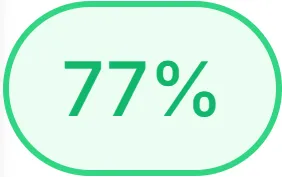
Overall Score for "Your Business Name"
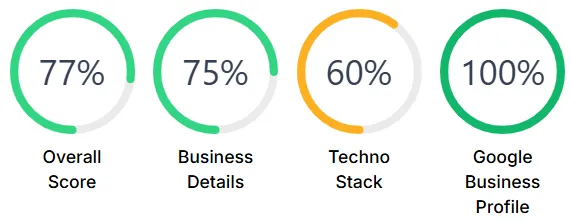
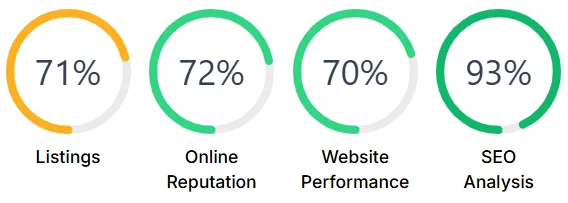
Individual Scores for "Your Business Name"
© 2026 Bizhackz Strategies - All Rights Reserved.


