

What is in a
"Clarity Scan"?
79% of customers do online research before making purchase decisions. Missing or partial information about your business leads to confusion and lost buyers. We can help you enhance your online presence and resolve the errors mentioned in the report in the following topic areas:

Claim A Free Marketing Audit Of Your Business
We'll show you exactly where you're falling short when
it comes to your Online Marketing.
For no cost, you'll receive:
Your Online Marketing Audit
A checklist of the exact items you need to fix
Google Business Profile
Claiming your Google Business Profile (GBP) is a key step in building a strong online presence, attracting customers, and establishing trust. We check the status of your company and found out if your business is successfully claimed.
For no cost, you'll receive:
Why it matters: An optimized GBP is your 24/7 storefront in local search—showing up with the right hours, photos and posts means more visibility, more calls and more foot traffic.
Business Address
A business address helps with Google by verifying your location for Google Business Profile, improving local SEO, and making your business show up in Google Maps and local search results—leading to more visibility and trust.
FAQ's
Is the Business Address complete and correctly formatted according to Google’s guidelines?
Ensure your business address in GHL is complete and formatted correctly for accurate location and search visibility. Verify spelling, suite/unit numbers, city, and zip code using the official USPS or local postal format. This prevents visibility issues, improves local SEO rankings, and enhances “near me” search appearances across Google and GHL’s directory features.
Is the business address verified on Google Business Profile?
Ensure your business address is verified on Google Business Profile (GBP) for full access to manage your listing. If not verified, request a postcard or alternative method via the GBP dashboard. This unlocks features like reviews, insights, and posts, builds trust with Google and potential customers, and enhances visibility. In GHL, ensuring your address is verified can improve the accuracy of your business’s information and lead to better local engagement.
Does the business address match exactly across all directories (NAP consistency)?
Ensure NAP (Name, Address, Phone) consistency across all directories for better SEO. Audit local citations using tools like BrightLocal or manually to fix discrepancies. This consistency signals trust to Google, improving local rankings and preventing customer confusion. In GHL, maintaining NAP consistency ensures accurate business information across platforms, boosting credibility and local search visibility.4o mini
Is the address showing correctly on Google Maps and Street View?
Ensure your business address is accurately displayed on Google Maps and Street View. Verify the map pin location, and if incorrect, request a map pin adjustment through GBP support. This prevents customer frustration, improves navigation, and enhances user trust. In GHL, having accurate location details across your profile ensures customers can easily find your business, improving engagement and visits.
Is the business located in a service area or a physical storefront?
Determine if your business is a service-area business (SAB) or a physical storefront. If you visit customers, hide the address and define service areas. If you have a physical location, display the address. This ensures compliance with Google’s policies, prevents suspension, and maintains visibility. In GHL, accurately setting this up ensures alignment with Google’s guidelines and avoids penalties, enhancing your local presence.
Is the business address in a shared workspace or virtual office?
If your business address is in a shared workspace or virtual office, ensure it meets Google’s guidelines by uploading proof of uniqueness (e.g., photos of signage, suite identifiers, or office interiors). This prevents suspension or removal from Google Maps and ensures the long-term stability of your Google listing. In GHL, maintaining clear documentation helps protect your business’s online presence and enhances trust with Google.
Does the address align with your actual customer-facing location (no P.O. Box or remote address)?
Ensure your business address is a valid customer-facing location and not a P.O. Box or remote address, as Google prohibits such listings. Update the address to reflect the actual location where customers can visit or be served. This ensures compliance with Google Business Profile guidelines, avoiding flags or loss of visibility. In GHL, keeping an accurate, customer-facing address improves your local SEO and strengthens your online presence.
Is your business address located in an area with high search demand or foot traffic?
If your business address is in a high-demand area with significant foot traffic, it can boost your local ranking and map pack visibility. To optimize, enhance other local SEO elements or consider relocating to a more strategic location if applicable. This improves relevance in local searches, potentially increasing in-store visits and generating more leads. In GHL, refining your business’s location strategy can strengthen your online and offline presence, driving growth.4o mini
Have you uploaded geo-tagged images from your business location?
Upload geo-tagged images of your business location, such as storefronts, signage, and surroundings. These images boost visibility in local search and add authenticity, helping Google better trust your location. This enhances engagement and strengthens your local SEO. In GHL, geo-tagging your images further improves local visibility and trust, benefiting both online and offline interactions.4o mini
Is your business address listed in local Chamber of Commerce, city registries, or local press?
Ensure your business address is listed in reputable local directories, such as the Chamber of Commerce, city registries, or local press. Google cross-references these authoritative sites to verify legitimacy, so getting featured with consistent address info boosts your credibility and local relevance. This strengthens ranking signals and enhances your community presence, both online and offline. In GHL, maintaining consistent listings across trusted platforms supports your local SEO strategy.
Operational Hours
Operational hours help Google show when your business is open, which improves local search rankings, builds trust, and increases the chances of customers contacting you during available times.

FAQ's
Are the operational hours on your Google Business Profile accurate and up to date?
Ensure the operational hours on your Google Business Profile (GBP) are accurate and up to date, including seasonal or holiday hours. Mismatched hours can frustrate customers, leading to missed visits or calls. Regular updates improve the customer experience, build trust, and reduce negative reviews, ultimately resulting in more leads and fewer missed opportunities. In GHL, syncing your operational hours with GBP ensures consistency and better engagement.
Do the operational hours reflect your peak business performance periods?
Ensure your operational hours on Google Business Profile (GBP) align with your peak business performance periods. Analyze sales or booking data to identify these times and adjust your hours accordingly. This captures high-intent customer traffic, boosts conversions, and increases satisfaction. Aligning your resources with demand prevents unnecessary downtime, enhancing overall business efficiency. In GHL, adjusting hours to match peak times improves visibility and engagement, leading to more conversions.
Have you added “Special Hours” for holidays or events?
Add "Special Hours" for holidays or events in advance to keep your Google Business Profile (GBP) accurate during irregular periods. Set reminders to update these hours for known holidays, preventing customer confusion. This enhances your professional image, boosts reliability, and improves visibility on Google. Accurate listings also reduce missed opportunities, such as walk-ins or calls. In GHL, maintaining special hours ensures your business is always aligned with customer expectations.
Do your operational hours match across all online platforms?
Ensure your operational hours are consistent across all online platforms, including your website, Facebook, Yelp, and Google Business Profile (GBP). Inconsistent hours can confuse customers and harm trust. Conduct an audit of all listings and use tools like Yext, BrightLocal, or GHL integrations to streamline updates. This creates a unified online presence, boosts local SEO signals, and increases customer confidence while preventing frustration from inaccurate information.
Are your opening hours optimized for local search visibility?
Optimize your opening hours for local search visibility, as Google ranks businesses higher when they are marked as "open." Review competitors’ hours and consider extending yours if feasible. This increases visibility during customer searches, boosts your placement on the local map pack, and gives you a competitive edge. More impressions lead to more conversions, enhancing your overall business performance. In GHL, ensuring accurate and strategic opening hours strengthens your local SEO and engagement.
Do you utilize attributes like “Open Late” or “Open 24 Hours” where applicable?
Do you utilize attributes like “Open Late” or “Open 24 Hours” where applicable? Explanation: Google shows these labels to users, especially those searching with urgency (e.g., “dentist open now”). Action Items: Check if your hours qualify you for such attributes. Add them in GBP attributes section. Benefits: Attracts customers needing immediate service. Differentiates you from standard-hour competitors. Advantages: Great for emergency or convenience-based businesses. Enhances click-through rate (CTR) on listings.
Are you tracking customer interactions during open vs. closed hours?
Track customer interactions during open vs. closed hours to adjust marketing strategies and staffing. Review GBP insights by time of day, and consider using call tracking tools or CRM integrations. This helps identify when demand is highest, enabling data-driven decisions about open times. It maximizes ROI on staffing and operations, and aligns ads or posts with active customer times, improving overall efficiency and engagement. In GHL, this data can help optimize campaigns and customer service operations.
Do your hours align with the customer expectation in your niche?
Ensure your hours align with customer expectations in your niche, as industries like gyms or convenience stores have set norms. Research competitor hours and survey customers for preferred times. This helps meet or exceed market standards, improving satisfaction and convenience. Aligning your hours increases customer loyalty and reduces lost business to more accessible competitors. In GHL, tracking customer preferences can inform smarter business decisions and enhance service offerings.
Are customers frequently asking about your hours via chat or calls?
If customers are frequently asking about your hours via chat or calls, it may indicate that your Google Business Profile (GBP) is unclear or missing information. Review call/chat logs and update your GBP FAQ or set auto-responses in GHL/Messenger. This reduces repetitive customer support tasks, improves communication efficiency, and saves staff time. It also enhances the overall customer journey by providing clear and timely information.
Have you enabled real-time updates for temporary closures (e.g., weather, emergencies)?
Enable real-time updates for temporary closures (e.g., weather or emergencies) using the "Temporarily Closed" feature in GBP. Link GBP with notification systems for quick updates. This ensures accurate status and prevents negative customer experiences, preserving your reputation even during unforeseen closures. It demonstrates professionalism and helps retain customer goodwill in challenging situations.
Business Website Linked
Linking your business website to Google helps build credibility, boosts your SEO rankings, drives traffic to your site, and allows Google to pull more accurate info about your business.

FAQ's
Is a website link currently added to the Google Business Profile (GBP)?
Ensure a website link is added to your Google Business Profile (GBP) to avoid losing potential customers who expect to find more information directly from the listing. Visit your GBP dashboard and ensure the "Website" field is correctly filled in with your business website link. This allows customers to easily access more details, enhancing trust, improving the customer experience, and potentially leading to more inquiries or sales directly from your GBP listing.
Is the linked website correct and live (not broken)?
Verify that the website linked in your Google Business Profile (GBP) is correct, live, and free of errors. Click the website link from your GBP listing to ensure it leads to the right page with no broken links or redirects. This ensures prospects land on the correct page to learn more or take action, boosting credibility and increasing the likelihood of conversions by providing seamless access to your site.
Is the linked website mobile-friendly?
Check if the linked website in your Google Business Profile (GBP) is mobile-friendly. Run Google’s Mobile-Friendly Test (https://search.google.com/test/mobile-friendly) and address any issues by working with your web developer or using responsive templates. A mobile-friendly site improves the user experience across all devices, especially phones and tablets, and helps with better rankings in local search results. A better user experience leads to lower bounce rates and higher customer satisfaction.
Does the linked website have consistent NAP (Name, Address, Phone Number)?
Ensure that your website's NAP (Name, Address, Phone Number) is consistent with what’s listed on your Google Business Profile (GBP). Check the footer, contact page, and metadata (including schema markup) to make sure the NAP matches exactly, including formatting. Consistent NAP reinforces your brand's legitimacy, strengthens local SEO, improves ranking authority, and avoids confusion, ultimately helping you retain more leads.4o mini
Is the website linked the homepage or a location-specific landing page?
If your Google Business Profile (GBP) links to the homepage, consider linking to a location-specific landing page (e.g., /locations/miami or /services/plumbing) instead. This can improve relevance and user engagement by directing users to the most appropriate page, tailored with local keywords and calls-to-action (CTAs). This boosts SEO for specific keywords and increases the likelihood of lead conversion by meeting the user’s needs more effectively.
Is the website HTTPS secure?
Ensure that your website uses HTTPS for secure browsing. Google favors secure websites (HTTPS) over insecure ones (HTTP), and visitors will see a warning if your site isn't secure, which could deter them from proceeding.
Does the linked website have clear calls to action (CTAs)?
Ensure your website has clear and effective calls to action (CTAs). Visitors need direction, and having CTAs like "Book Now," "Call Today," or "Get a Free Quote" encourages immediate action.
Does the page load fast (especially on mobile)?
Ensure your website loads quickly, especially on mobile devices. Speed is both a ranking factor and crucial for user experience. Even a few seconds of delay can cause visitors to leave.
Does the linked website include local schema markup?
Ensure your website includes local schema markup (structured data) to help Google better understand your business content and display rich results such as reviews, hours, and location.
Is there tracking in place to measure GBP-driven traffic?
Ensure you have tracking in place to measure GBP-driven traffic so you can evaluate the effectiveness of your Google Business Profile listing.
Phone Number Visible
A visible phone number helps with Google by boosting trust, enabling direct calls, and improving local SEO and click-through rates.

FAQ's
Is the phone number visible on the Google Business Profile (GBP)?
Ensuring your phone number is visible on your GBP is crucial for accessibility and conversions. If potential customers can’t find your number, they may choose a competitor instead.
Is the phone number clickable on mobile devices?
If your phone number isn’t tap-to-call enabled, users may not manually dial, leading to lost leads. Ensuring your number is properly formatted enhances the mobile user experience, drives instant engagement, boosts mobile call conversions, and reduces friction for mobile users.
Is the phone number consistent across all listings and platforms?
Inconsistent NAP (Name, Address, Phone) information confuses both users and search engines, negatively impacting SEO and trust. Ensuring consistency improves local SEO rankings, builds customer trust, increases visibility in the map pack, and reduces misdialed or missed opportunities.
Is the phone number being tracked for performance analytics?
Without tracking, you won’t know how many calls your GBP is generating. Tracking allows for clear ROI measurement, helps understand which listings drive the most engagement, enables data-driven optimization, and identifies peak call times for better staffing decisions.
Is the phone number linked to a phone that is actively answered during business hours?
Even with a visible number, if calls aren’t answered promptly, leads are lost. Ensuring that your phone is actively answered during business hours captures more leads, increases customer satisfaction, and builds a strong brand reputation for responsiveness.
Has the phone number visibility been affected by recent GBP suspensions or errors?
Sometimes changes or suspensions can cause the phone number to be hidden or removed from your GBP. Regularly checking for issues ensures your business remains accessible, avoids listing downtime, and prevents ranking penalties from inactive profiles.
Is the phone number a local area code or a toll-free/global number?
Local numbers often convert better because they build trust within a specific geographic area. Using a local number strengthens your presence, increases the likelihood of contact from local searchers, and improves your performance in local map rankings.
Is the phone number visible on both desktop and mobile versions of Google Maps and Search?
Display can vary based on the device. Ensuring consistency across all platforms helps avoid display errors, ensuring that your phone number is visible and accessible on both desktop and mobile versions of Google Maps and Search.
Is your Google Business phone number used in call-to-action (CTA) language in your GBP description or posts?
Using phrases like “Call us now at…” in your GBP description or posts can encourage direct interaction and prompt action from potential customers.
Have you enabled call history or call logs in GBP to track missed and answered calls?
Google allows some business profiles to track calls made through the listing. Enabling call history helps you understand call performance, identify missed opportunities, and improve responsiveness.
Google Photos
Google Photos helps by backing up and organizing images, which can enhance your online presence and support visual content in Google services.
FAQ's
How many photos are currently uploaded to our Google Business Profile?
The total number of photos on your profile directly impacts how Google perceives your business activity and customer engagement. Profiles with more relevant, high-quality images often rank higher and appear more trustworthy to potential customers. Google organizes photos into categories like owner photos, customer photos, 360° images, videos, interior, exterior, team, etc. Having a variety of photo types strengthens your profile’s completeness.
What types of photos are missing from our profile?
Google wants to see a well-rounded view of your business, and missing key photo categories (like interior, exterior, staff, products, and services) can negatively impact your profile’s completeness and reduce customer trust. A complete profile helps potential clients feel more comfortable before visiting or calling, making them more likely to choose your business over competitors.
Are our photos optimized for quality, size, and branding?
Photos that are pixelated, too dark, cluttered, or unbranded can turn away potential customers. Your photos should reflect the professionalism and style of your business. High-resolution, well-lit images that follow your branding guidelines create a strong and consistent brand experience that resonates with your audience.
How frequently are new photos added to the profile?
Google rewards businesses that show activity. Consistently uploading new photos (even just 1–2 per week) signals to Google that your business is fresh and relevant. It also provides return visitors with new content, which encourages them to revisit your listing. A stagnant profile may appear inactive, both to Google and to potential customers.
How does our photo count compare to top competitors in our area?
Local SEO is highly competitive, and the number of photos on your Google Business Profile (GBP) can impact how your business is ranked. Google uses photo count as a ranking signal—businesses with more relevant, high-quality images tend to get more attention and clicks. If your competitors have significantly more photos, they may be ahead of you in visibility. This is an easy and free way to boost your online presence and local rankings.
Are customer-submitted photos helping or hurting our brand?
Although Google strips metadata after upload, geo-tagging and using keyword-based file naming before uploading may influence Google’s interpretation of your content. By naming your files with relevant keywords and location (e.g., “interior-bizname-city.jpg”), you provide context that can help with local SEO and improve visibility.
Are we using seasonal or promotional photos to our advantage?
Adding photos related to current events, holidays, or seasonal offers shows that your business is engaged, timely, and responsive to trends. It also drives more clicks from people searching for specific seasonal content or promotions. This strategy helps keep your listing fresh and increases the likelihood of attracting new customers during peak seasons.
Are photos properly categorized (e.g., logo, cover, interior)?
Google allows you to designate certain photos for specific roles (like the cover or logo photo), and it’s essential to ensure these are set correctly. If not, Google may select unflattering customer-uploaded images by default. Proper categorization ensures your best photos are featured prominently, giving you more control over how your business is presented.
Are our images being viewed and engaged with? What are the stats?
In your Google Business Profile dashboard, the “Insights” section provides valuable data on how many views your photos are getting. By analyzing high-performing photos, you can identify what resonates with your audience and guide your future content strategy, ensuring you focus on what works.
Are our photos geotagged and named correctly for SEO?
Although Google strips metadata from images once uploaded, geo-tagging and using keyword-rich file names before upload can still influence how Google interprets and ranks your images. Properly naming your files with relevant keywords and location details, such as "interior-bizname-city.jpg," helps Google better understand the content, potentially improving your local search rankings and image discovery.
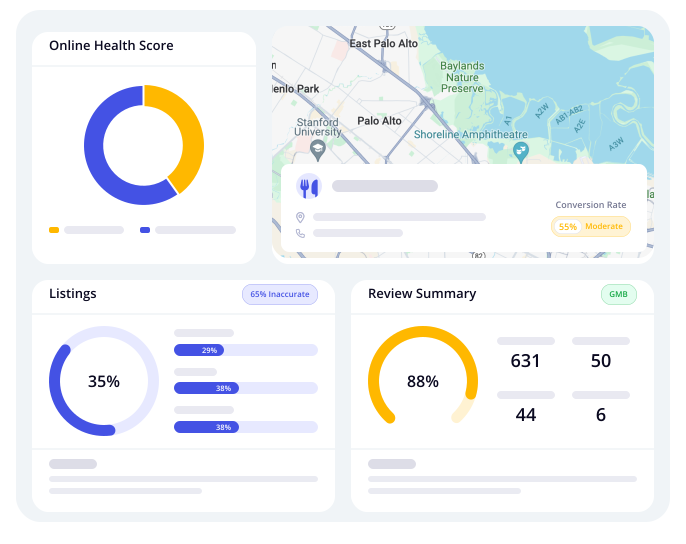
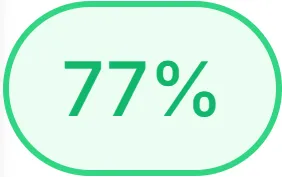
Overall Score for "Your Business Name"
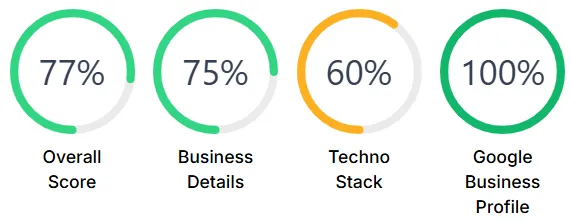
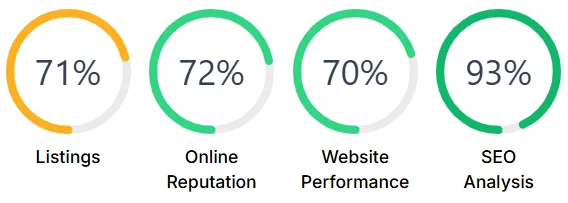
Individual Scores for "Your Business Name"
© 2026 Bizhackz Strategies - All Rights Reserved.


